
Melodic Sight Reading
Read and perform single-line melodic exercises created for the selected instrument, clef, range, meter, rhythm level, key, and tempo.
Create sight-reading exercises for your instrument, shape them around what you want to practice, then perform with the device’s built-in microphone or MIDI and get precise feedback on the score and in the final report.


See Music Pro lets you create practice material around the skills you want to develop, then combines microphone and MIDI performance input, score-level feedback, rhythm practice, dictation, progress tracking, and achievements in one focused practice environment.
Choose an instrument, check the microphone, use the metronome, design an exercise, start practicing, or train your ear with Dictation—all from one central screen.
Progress, Judges, Preferences, and related tools stay close at hand without crowding the main workflow.

Select a built-in instrument and clef profile, or define a custom instrument by choosing its name, clef, transposition, and written range.
Exercises use the selected clef, written range, and transposition.
Create one shared custom profile for an additional single-line instrument.
Calibrate attacks, notes, rests, sustain behavior, and the current recording environment.

Work on a complete melodic performance, isolate note recognition, focus entirely on rhythm, or strengthen the connection between hearing and notation.
Read and perform single-line melodic exercises created for the selected instrument, clef, range, meter, rhythm level, key, and tempo.

Practice written-note recognition without continuous rhythm. See Music Pro waits for each note before advancing to the next one.

Ignore pitch and concentrate on timing. Perform the written rhythm by tapping the screen, pressing a key, or using MIDI timing input.

Listen to an example and choose which of three written scores matches what you heard. The examples follow your current exercise level and musical settings. The examples use the current exercise level and musical settings.
The score shows where the performance matched the exercise and where it needs attention. The report summarizes the result by musical dimension.
Play an acoustic instrument or sing through the device’s built-in microphone. See Music Pro records the performance and analyzes it after the exercise.
Use a connected MIDI keyboard for exact note-on pitch and timing input with immediate score feedback.
Practice rhythm with the on-screen Tap Pad or a keyboard key when pitch is not part of the exercise.
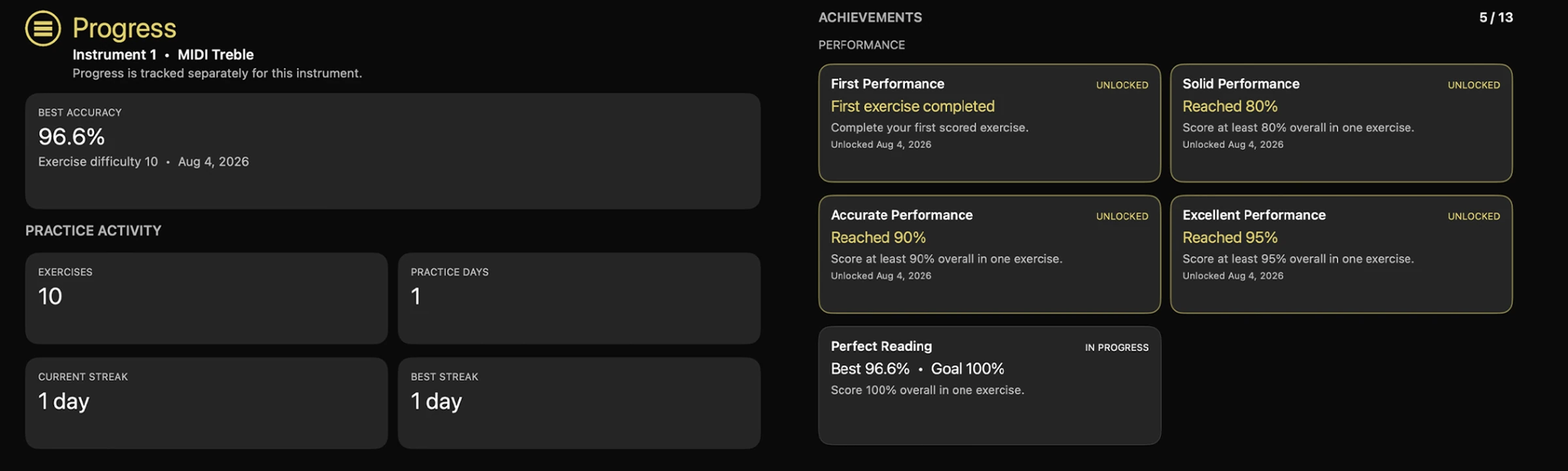
Track best accuracy, completed exercises, practice days, and streaks separately for each instrument. Achievements recognize milestones and show the next goal within reach.
Start with recommended settings or take control yourself. Shape the length, range, melodic contour, key, rhythm, tempo, meter, and other details around exactly what you want to practice.
From Note by Note and one bar to longer multi-bar exercises.
Staff, high, low, full, rhythm-only, or a player-defined range.
Stepwise, triadic, or random melodic movement.
Major, minor, atonal, and progressively broader key choices.
From easy values to syncopation, triplets, sixteenths, and expert material.
Choose pacing and meters including simple, compound, and irregular time signatures.
Create the material you want to practice, perform it on your instrument, and get feedback that points directly to what to work on next.
See Music Pro is designed for single-staff melodic sight reading. Piano players practice treble or bass clef separately rather than grand staff.
Sight-reading practice for iPhone, iPad, and compatible Macs.
View on the App Store Read the FAQKey details about instruments, input, calibration, piano, and the original See Music.
See Music Pro includes 29 built-in instrument and clef profiles across woodwinds, brass, strings, guitar, voice, piano, and MIDI. My Instrument lets you define an additional single-line instrument by name, clef, transposition, and written range.
Yes. Use the device’s built-in microphone, calibrate the active instrument, and perform the exercise normally. The app records first and then analyzes the complete performance.
No. See Music Pro’s acoustic analysis and calibration are designed for the device’s built-in microphone. External USB microphones, audio interfaces, Bluetooth microphones, and headset microphones are not currently supported for judged acoustic performances.
Yes. MIDI Treble and MIDI Bass profiles use exact MIDI pitch and note-on timing. Rhythm Practice can also use MIDI timing input.
Yes, for single-line reading. Choose Piano Treble for right-hand melodic practice or Piano Bass for left-hand practice. The app does not generate grand-staff or polyphonic piano exercises.
Acoustic instruments differ in their attacks, harmonics, sustain, register behavior, and interaction with room noise. Calibration gives the analysis instrument-specific evidence before it judges a performance.
See Music Pro is the modern successor to the original See Music, rebuilt with a redesigned interface, more precise audio analysis, instrument calibration, detailed performance reports, Progress, Achievements, new practice modes, and support for current Apple platforms.
Yes. See Music Pro is available for iPhone and iPad, and also runs on compatible Apple silicon Macs. On the Mac App Store, search for See Music Pro and select iPhone & iPad Apps to find and install it.