MIDI Visualization • Voicing Analysis • Chord Theory • 4K Video Export
Harmony Vision Pro is now:

VoicingFlow

Create theory-aware piano tutorial videos and analyze how voicings work in harmonic context.

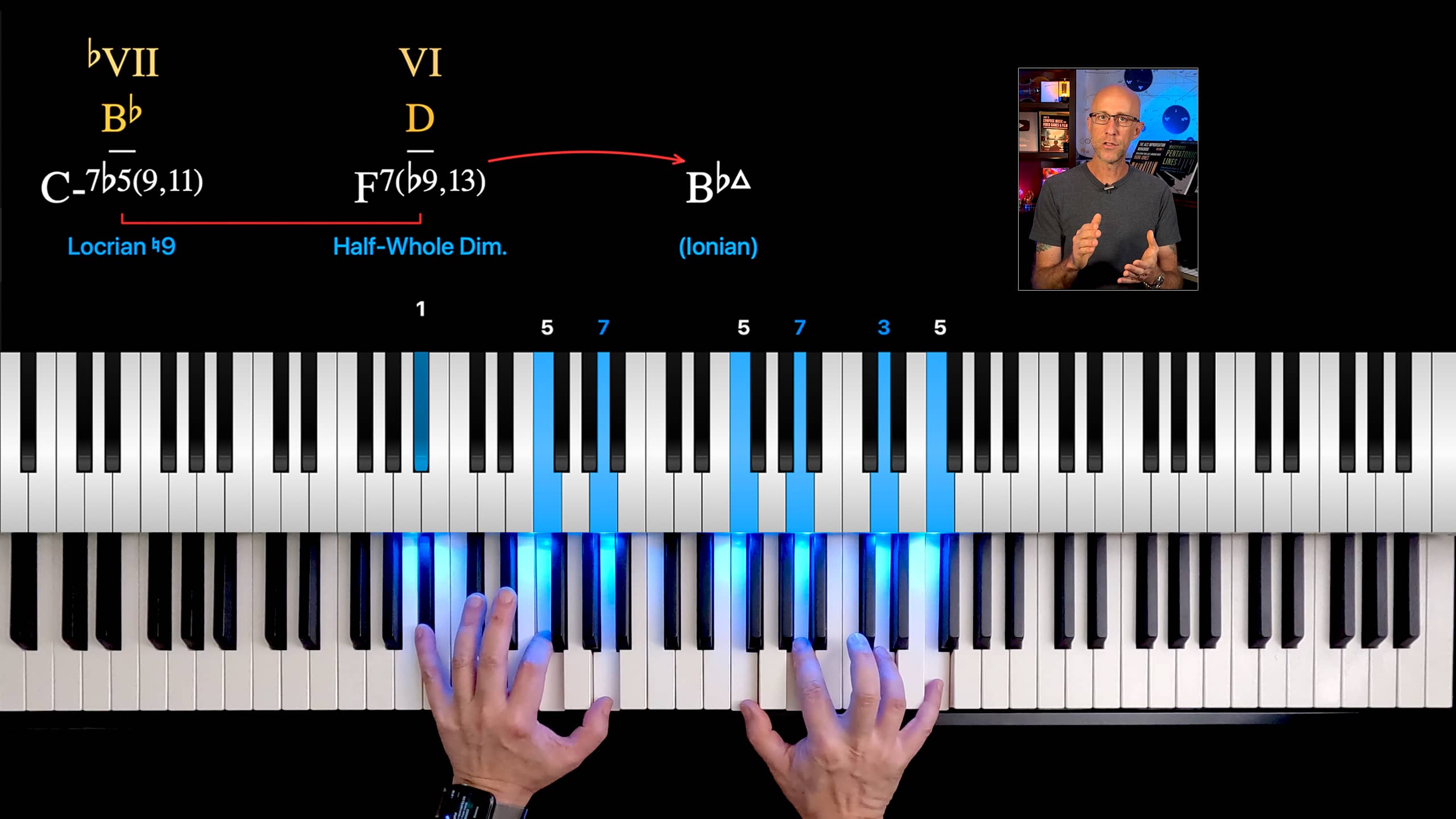
VoicingFlow is not just a falling-notes MIDI renderer. It shows what the notes mean: chord symbols, chord-scales, guide tones, tensions, upper structures, cadence arrows, theory-aware note labels, Voicing Balance, and contextual Voicing Fit analysis.

Version 1.2 is available now on the Mac App Store. Download it free, open your MIDI files, add harmonic context, and export theory-aware piano tutorial videos.
Free to try. Free exports include a watermark. Upgrade in the app to remove the watermark.
This early preview video uses the original working name, Harmony Vision Pro. The app is now released as VoicingFlow. A new VoicingFlow 1.2 video is coming soon.
VoicingFlow Icon

A theory layer for your piano tutorial videos

A MIDI file tells you which notes were played. VoicingFlow helps you show the chord, function, scale relationship, tension structure, harmonic motion, and contextual voicing fit behind those notes.

VoicingFlow overview: theory-aware piano tutorial video with chord symbols, chord-scales, hands video, and teacher inset
Previously announced as Harmony Vision Pro
VoicingFlow is the same macOS app that was originally previewed under the Harmony Vision Pro name. If you joined the notification list for Harmony Vision Pro, this is the official release.
Download VoicingFlow
New in Version 1.2

Voicing Fit: contextual analysis for jazz voicings

A voicing is not just a stack of notes. Its meaning changes depending on the harmonic context.

VoicingFlow 1.2 introduces Voicing Fit, a contextual analysis system that evaluates how well the current voicing works over the chord you provide.

Voicing Fit Rating
Evaluate the current voicing as Risky, Usable, Strong, or Excellent based on harmonic, acoustic, and register behavior.
Voicing Fit Report
Open a detailed report showing contextual note function, harmonic positives and negatives, acoustic profile, register issues, and final score.
Voicing Balance Graph
Visualize the intrinsic balance of the voicing: register spread, density, spacing, and note distribution.
Live Context Testing
Play a root-position triad or seventh chord as the harmonic reference and see how the analysis changes when the context changes.
Version 1.2 is available now on the Mac App Store.
VoicingFlow Voicing Fit Report showing contextual voicing analysis, score, acoustic fit, chord-scale, note functions, and piano keyboard visualization
Creator Workflow

Create a theory-aware piano tutorial video

Record, author, preview, export, and combine with your teaching footage.

1

Record your performance

Record your musical examples with a MIDI keyboard while simultaneously recording video of your hands. Because the MIDI and video are captured at the same time, they stay in sync.

2

Open the MIDI file

Launch VoicingFlow and open the MIDI performance. The app analyzes the file and moves through each musical moment where harmonic context can be added.

3

Add harmonic context

At each frame, play the basic harmonic reference chord — always a root-position seventh chord or triad — using MIDI-IN.

4

Preview the theory display

VoicingFlow adds chord symbols, chord-scales, guide tones, tensions, note labels, upper structures, and cadence motion.

5

Export enhanced MIDI

Save the original performance plus the harmonic information you added, so the file can be reopened later with all theory displays already prepared.

6

Export 4K video

Render the final theory visualization and combine it with your hand-performance footage and teacher explanation in your video editor.
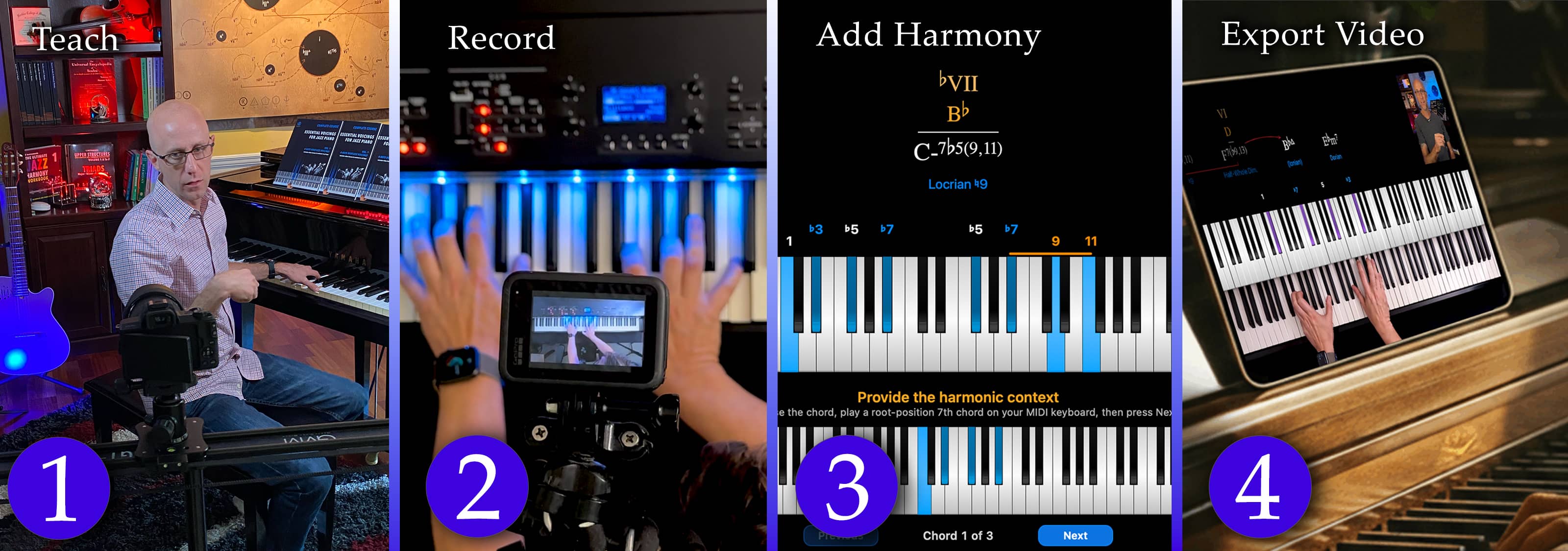
VoicingFlow workflow: teach, record, add harmony, export video
Real Lesson Example

Watch a real lesson created with VoicingFlow

This demo lesson shows how VoicingFlow can turn a jazz piano example into a clear theory-aware tutorial, with chord symbols, chord-scales, guide tones, tensions, harmonic motion, and voicing analysis visible while the music plays.

Instead of only showing falling notes, the video helps students understand what the notes mean harmonically — the chord, the scale relationship, the upper structures, the musical context, and how the voicing behaves inside that context.

Watch on YouTube

Built for music educators, not just MIDI playback

VoicingFlow turns your harmonic analysis into a visual teaching layer.

Theory-Aware MIDI Visualization
Render piano MIDI performances with harmonic meaning, not just animated notes.
Voicing Fit Analysis
Evaluate how well the current voicing works over the harmonic context you provide.
Voicing Fit Report
Show harmonic positives and negatives, contextual note functions, acoustic profile, register behavior, and final score.
Voicing Balance Graph
Visualize the intrinsic spacing, range, density, and balance of the current voicing.
Chord Symbols
Display the harmonic context behind each musical moment.
Chord-Scales
Show the scale relationship connected to each chord so students understand the sound.
Guide Tones & Tensions
Label roots, guide tones, chord tones, and tensions directly on the keyboard.
Upper Structure Detection
Reveal triads, quartals, and upper-structure colors inside advanced voicings.
Cadence Arrows & Brackets
Highlight harmonic motion such as II–V relationships and resolutions.
Channel 2 Authoring
Add exact harmonic context by playing simple reference chords on your MIDI keyboard.
Enhanced MIDI Export
Save your MIDI file with embedded harmonic context for future editing or re-rendering.
4K Video Export
Render high-resolution visuals ready for YouTube, courses, and professional tutorials.

Why harmonic context matters

A MIDI file only knows which notes were played. It does not always know what those notes mean.

The same voicing can function as a stable chord-tone structure, a colorful upper structure, a suspended dominant sound, an altered dominant color, or a risky avoid-tone sonority depending on the harmonic context.

VoicingFlow lets you add the intended analysis by playing simple reference chords. Then the app can show not only the chord symbol and chord-scale, but also how the current voicing fits that context.

Jazz piano tutorials
II–V–I progressions
Reharmonization lessons
Bill Evans-style voicings
Upper-structure harmony
Chord-scale explanations
Modal voicings
Complex dominant sounds

More than a falling-notes visualizer

Standard MIDI Visualizer VoicingFlow
Shows which notes were played Shows notes and harmonic function
Displays the performance only Adds chord symbols, chord-scales, and context
No theory awareness Labels guide tones, tensions, roots, and note functions
No voicing evaluation Rates how well a voicing fits the harmonic context
No detailed harmonic report Generates a Voicing Fit Report for the current voicing and context
Generic MIDI output Designed specifically for piano education videos
Good for visual appeal Built to teach harmonic meaning

Export tutorial-ready video

Render a finished theory visualization and bring it into your video editor.

4K Export
High-resolution video output for professional lessons.
Progress Feedback
Percentage, frame count, elapsed time, and estimated remaining time.
Enhanced MIDI
Save your harmonic context for future edits and re-renders.
Editor Ready
Combine with hand footage, narration, titles, and course content.

Who VoicingFlow is for

User Type Typical Use-Cases Most Helpful Features Key Benefit
Piano Teachers
  • Create visual explanations for lessons
  • Show chord tones and tensions clearly
  • Prepare reusable lesson visuals
Chord Symbols, Note Labels, Chord-Scales, Voicing Fit Students see the theory behind the notes
Jazz Educators
  • Explain II–V–I progressions
  • Show substitutions and reharmonizations
  • Reveal upper structures inside voicings
Cadence Arrows, Guide Tones, Tensions, Upper Structures, Voicing Fit Report Advanced harmony becomes visible
YouTube Creators
  • Create polished piano tutorial videos
  • Export high-resolution visual overlays
  • Combine output with hand-camera footage
4K Export, Themes, Watermark Removal Faster tutorial-video production
Course Creators
  • Build consistent lesson visuals
  • Reuse enhanced MIDI files
  • Update or re-export lessons later
Enhanced MIDI Export, Authoring Mode, Preferences A repeatable workflow for professional courses
Composers / Arrangers
  • Demonstrate harmonic ideas
  • Show reharmonized passages
  • Explain voicings and chord-scales visually
Chord-Scales, Upper Structures, Cadence Motion, Voicing Balance Clearer harmonic storytelling
Shape VoicingFlow

Help guide the next development cycle

VoicingFlow 1.2 is available now, and the next round of features is already being planned.

Arranger’s Circle members can suggest workflows, feature ideas, pain points, and improvements for future versions of VoicingFlow. Suggestions are reviewed and considered, but they are not guaranteed, and final product/design decisions remain with mDecks Music.

As a thank-you, active Arranger’s Circle members at the time of each major VoicingFlow update release receive one month of watermark-free VoicingFlow access.

Future ideas being explored

  • Live Voicing Analyzer mode
  • Context chord suggestions for any voicing
  • Famous-player-inspired voicing libraries
  • More educator-focused workflow improvements
Join the Arranger’s Circle Read the VoicingFlow Update
Placeholder Patreon links are included for testing. Replace the constants at the top of this file after publishing the collection and public post.

Show what the notes mean

VoicingFlow helps you turn a MIDI piano performance into a complete educational visual: notes, chord symbols, chord-scales, guide tones, tensions, upper structures, harmonic motion, voicing balance, and contextual Voicing Fit analysis.

Use it to create YouTube tutorials, online-course lessons, jazz piano demonstrations, voicing studies, reharmonization walkthroughs, and theory-aware performance videos.

VoicingFlow Icon

VoicingFlow

Available now on the Mac App Store. Free to try. Free exports include a watermark; the in-app upgrade removes the watermark.

Download Free on the Mac App Store Read the FAQ

Frequently Asked Questions

Here are a few common questions. For the complete FAQ, visit the VoicingFlow FAQ page.

Full FAQ

FAQ: Is VoicingFlow 1.2 available now?

Yes. VoicingFlow 1.2 is available now on the Mac App Store for macOS.

FAQ: Is VoicingFlow free?

VoicingFlow is free to try. Free exports include a watermark. To remove the watermark, purchase any available upgrade option inside the app.

FAQ: What is Voicing Fit?

Voicing Fit analyzes how well the current voicing works over the harmonic context you provide. It looks at chord tones, guide tones, tensions, avoid tones, register behavior, acoustic density, and overall harmonic usefulness, then gives the voicing a rating such as Risky, Usable, Strong, or Excellent.

FAQ: Is Voicing Fit the same as Voicing Balance?

No. Voicing Balance describes intrinsic properties of the voicing itself, such as spacing, range, density, and note distribution. Voicing Fit is context-dependent: the same voicing can be Excellent over one chord, Strong over another, and Risky over a different harmonic context.

FAQ: Is Voicing Fit automatic chord detection?

No. Voicing Fit depends on the harmonic context you provide. You play a simple root-position triad or seventh chord as the reference, and VoicingFlow analyzes the current voicing against that context. This keeps the result musically intentional instead of relying on generic chord guessing.

FAQ: What is “Shape VoicingFlow”?

Shape VoicingFlow is the development/community space for future VoicingFlow updates. Arranger’s Circle members can suggest workflows, feature ideas, and improvements. Suggestions are reviewed and considered, but they are not guaranteed to be implemented. Active Arranger’s Circle members at the time of each major VoicingFlow update release receive one month of watermark-free VoicingFlow access.

FAQ: Can I use VoicingFlow exports commercially?

Yes. You can use videos exported from VoicingFlow in your own commercial content, including YouTube videos, online courses, paid tutorials, memberships, and educational products.

If you use the free version, exported videos include a watermark. To remove the watermark, purchase any available upgrade option inside the app.

FAQ: Can I use the exported video in my editor?

Yes. Export the VoicingFlow visualization, then import it into your video editor of choice and combine it with your hand-camera footage, narration, titles, final piano audio, and lesson content.